
Variable data verification in digital printing
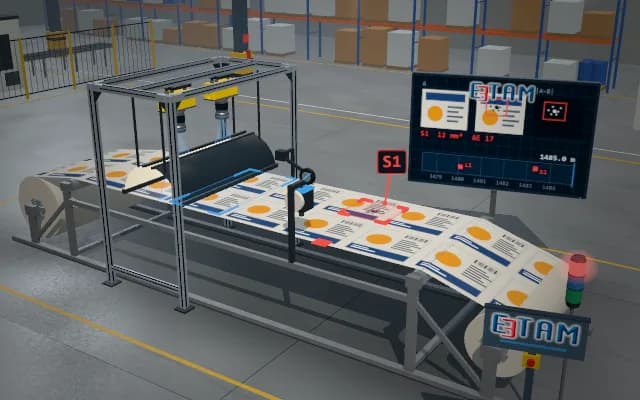
The serial number and 2D code on every page leaving the digital press are read by a line-scan camera and matched with the expected record in the job file. Streaks and banding caused by the print head are searched in the same image; a page that does not match or cannot be read is marked.
Read data and match result are written to the job record for every page; a faulty page is marked at its edge, the stack light warns and missing records are added to the reprint list.

- 01 Infeed
- 02 Scan
- 03 Read
- 04 Match
The page leaves the digital press and approaches the camera on the belt.
- Read
- —
- Expected
- —
- Streak faults
- —
Scenes are illustrative simulations; they are not customer references or performance guarantees.
Need
Every page is different, so comparison with a fixed template is not possible. A duplicated or skipped serial number goes unnoticed by eye. A clogged nozzle leaves a thin streak in the print direction and, when it runs through the code, quietly lowers its readability.
Solution approach
A line-scan camera scans the page across its full width under an even bar light. The position of the variable fields is known from the job file: text is read by character recognition and the code by a decoder, then compared with the next expected record. Column averages along the print direction are monitored separately; a narrow, continuous deviation is separated as a streak or band.
Process steps
- 01
Infeed
The page leaves the digital press and approaches the camera on the belt.
- 02
Scan
The page passes under the line-scan camera; the full-page image builds up.
- 03
Read
Serial number and 2D code are read; streak analysis is run along the print direction.
- 04
Match
The read data is compared with the expected record; a faulty page is marked.
Related applications





Let us assess your application together
We test your sample in our laboratory and report on resolution, optics and lighting selection.